Releasing to Maven Central
Maven Central is one important distribution of KeY. Multiple secondary projects depends on this, like key-citool, key-rpc.
This text shortly described the necessary steps to deploy on this channel very manually.
Pre-requiresite
Ensure you have access on
org.key-projectnamespace. Access can be requested by the senior team member.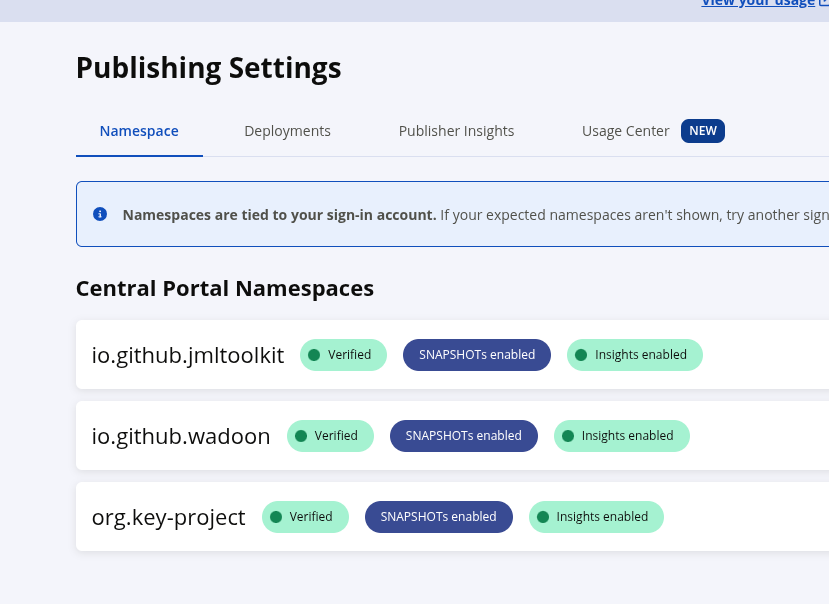
Ensure that you are familar with the rules on Maven Central and general process.
Get app credentials (TOKEN + SECRET).
Deployment.
Ensure you are on the release branch. Clean-up!
$ gradle clean
$ rm -rf local
Freshly build KeY, and deploy into local repo. For this you need to setup GPG before hand.
export ORG_GRADLE_PROJECT_signingInMemoryKeyPassword=<the keys password>
export ORG_GRADLE_PROJECT_signingInMemoryKey=$(gpg --export-secret-keys --armor 0DB557D9253539E9D63F9F40FFD16124DA897262 gpg | tac | tail -n +3 | tac | tail -n +3 | tr -d '\n')

gradle --parallel publishMavenPublicationToLOCALRepository
Pack the repo together correctly:
7z a deployment.zip -w local/.Resulting in currently 200MB.
Upload:
curl --user "${SONATYPE_API_TOKEN}:${SONATYPE_API_SECRET}" \
    -H 'Content-Type: multipart/form-data' \
    -F "bundle=@${BUNDLE_PATH};type=application/zip" \
    "${UPLOAD_ENDPOINT}?publishingType=USER_MANAGED"
In the background, the validation process starts. Login into central, and check the status. You can publish, if there are no errors.

Publication and indexing can take upto 30 minutes easily.